Updated August 5, 2026 · CensorMate Blog
How to Avoid YouTube Demonetization in 2026: Complete Guide
Nothing stings like the yellow dollar sign. One demonetized video can cost you hundreds — sometimes thousands — of dollars in lost ad revenue, and YouTube’s advertiser-friendly guidelines get stricter every year. This guide covers exactly what triggers demonetization in 2026, and the fastest way to stop the #1 cause before your video ever reaches YouTube’s review systems.
What is YouTube Demonetization?
YouTube demonetization happens when a video doesn’t meet the advertiser-friendly content guidelines. Instead of full ad revenue, you get one of three verdicts:
💚 Green Dollar Sign
Fully monetized. All ads running, maximum revenue potential.
💛 Yellow Dollar Sign
Limited ads. Many advertisers excluded — creators typically report a 40–90% revenue loss on yellow-icon videos.
🚫 Red / No Dollar Sign
Fully demonetized. Zero ad revenue on that video.
The brutal part: YouTube’s automated systems assign these ratings at upload, before a human ever watches. By the time you appeal, the crucial first 48 hours of a video’s traffic — where most of its lifetime revenue concentrates — are already gone.
Why YouTube Demonetizes Videos
The advertiser-friendly guidelines cover several categories:
- Profanity and strong language — by far the most common trigger for everyday creators
- Adult content — including suggestive themes
- Violence and shocking content — even in gaming contexts
- Drugs and alcohol — depiction or promotion
- Sensitive events — tragedies, conflicts, health crises
- Copyright issues — technically a separate system, same revenue result
Most categories require editorial judgment. But the biggest one is purely mechanical — and completely fixable.
The #1 Cause: Profanity in Your Videos
YouTube’s profanity rules work roughly like this in 2026:
- Strong profanity in the first 7–15 seconds → high risk of limited ads
- Repeated strong profanity throughout the video → limited or no ads
- Moderate profanity after the intro → usually fine, but stacking risk
- Profanity in titles or thumbnails → immediate limited ads
Here’s what makes profanity uniquely frustrating: it’s the only demonetization trigger that’s binary and detectable. YouTube’s speech recognition hears every word. One slipped f-bomb in your intro — even mid-laugh, even quoting someone — and the classifier flags you.
The fix used to mean scrubbing your timeline in Premiere for hours, hunting each word by hand. Not anymore.
🎬 Bleep every bad word before YouTube ever hears it — free, in your browser.
Try CensorMate free🔒 100% on-device AI. Your footage never leaves your computer.
How to Censor Profanity Before You Upload (3 Minutes)
CensorMate uses on-device AI to find and bleep any word in your video — no uploading your raw footage to a cloud service, no timeline scrubbing.
Step 1: Drop in your video
Open CensorMate, drag in your video (MP4, WebM, MOV, MKV — or plain audio), and type the words you want gone. You can paste an entire keyword list, or load the built-in profanity pack.
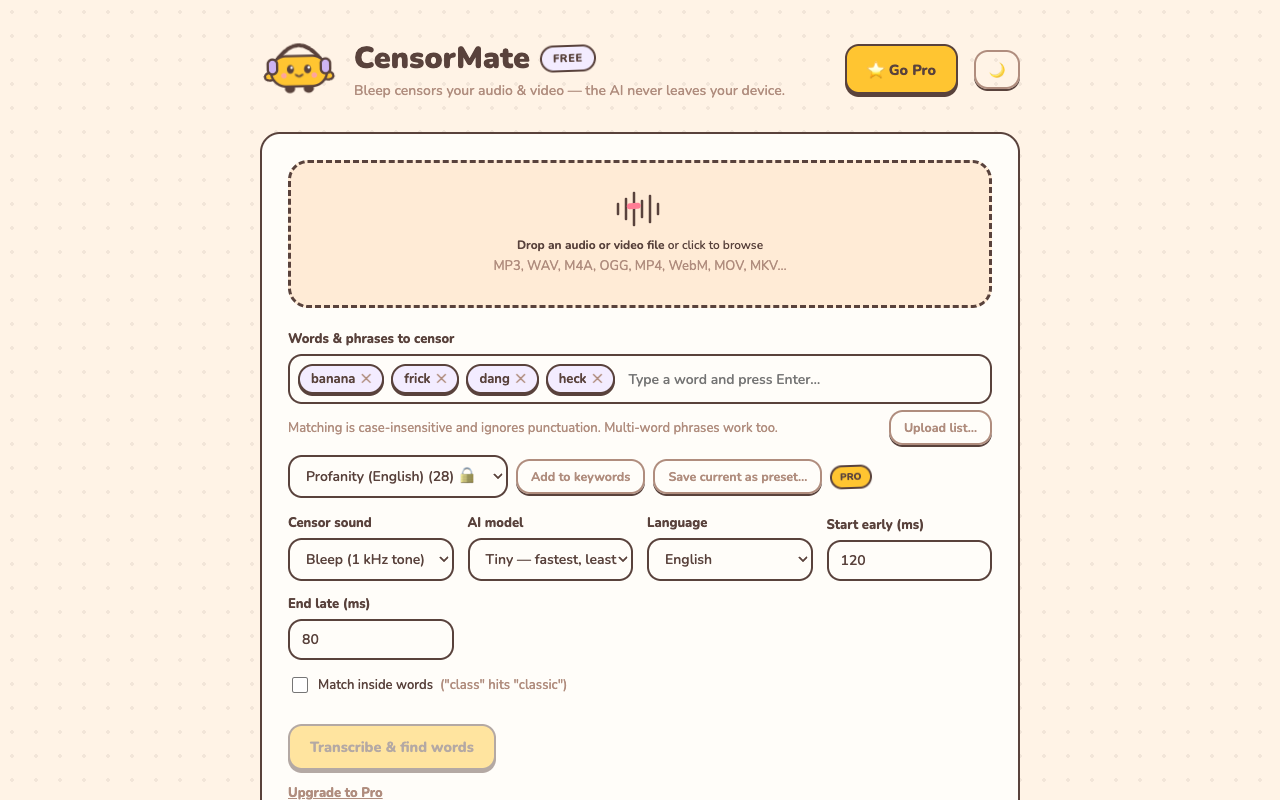
Add your own words or upload a whole list — matching is case-insensitive and catches phrases too.
Step 2: Review what the AI found
CensorMate transcribes your audio locally (nothing is uploaded — the AI runs in your browser) and highlights every match with word-level precision. Click any word to censor or un-censor it. You get final say before anything changes.
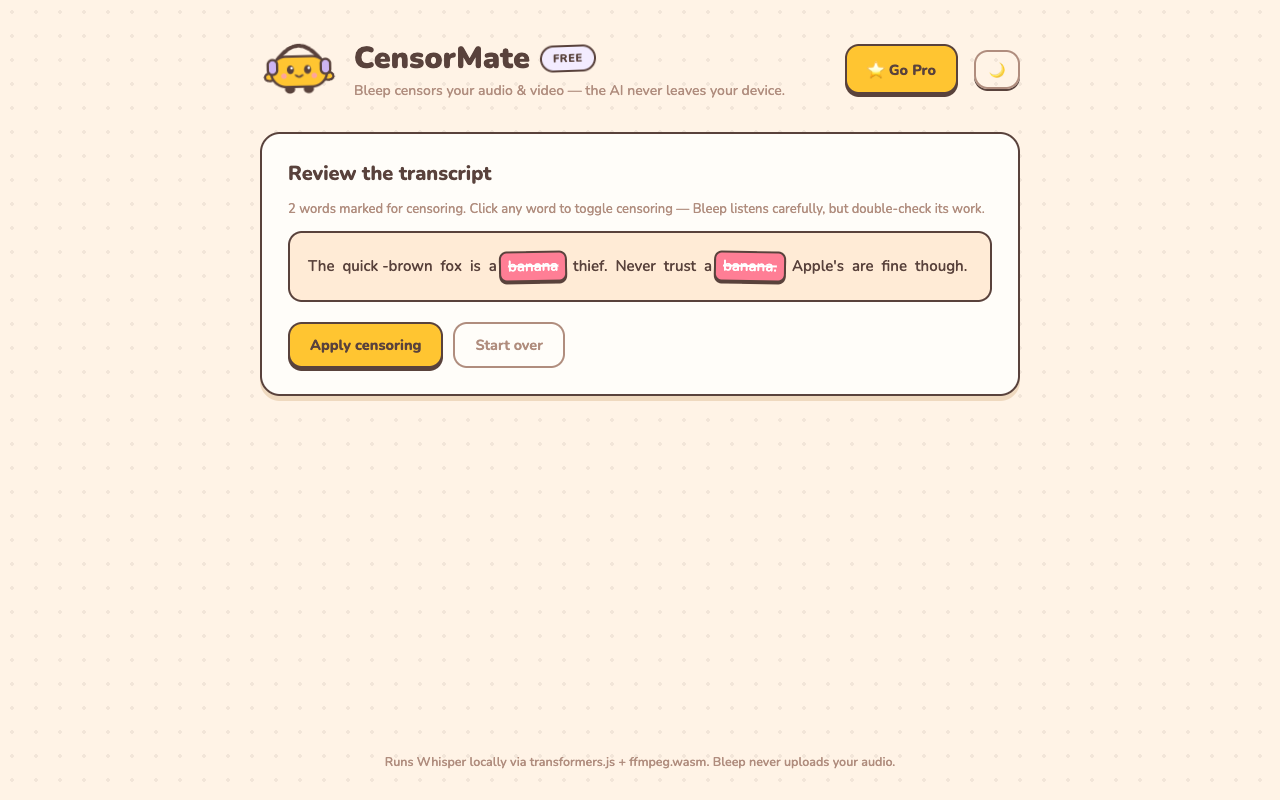
Every hit is highlighted in the transcript — one click to toggle any word.
Step 3: Download the clean version
Hit apply. Each flagged word gets a broadcast-style bleep (or clean silence) at exactly the right moment, your video quality is untouched, and you download a file ready to upload with confidence.
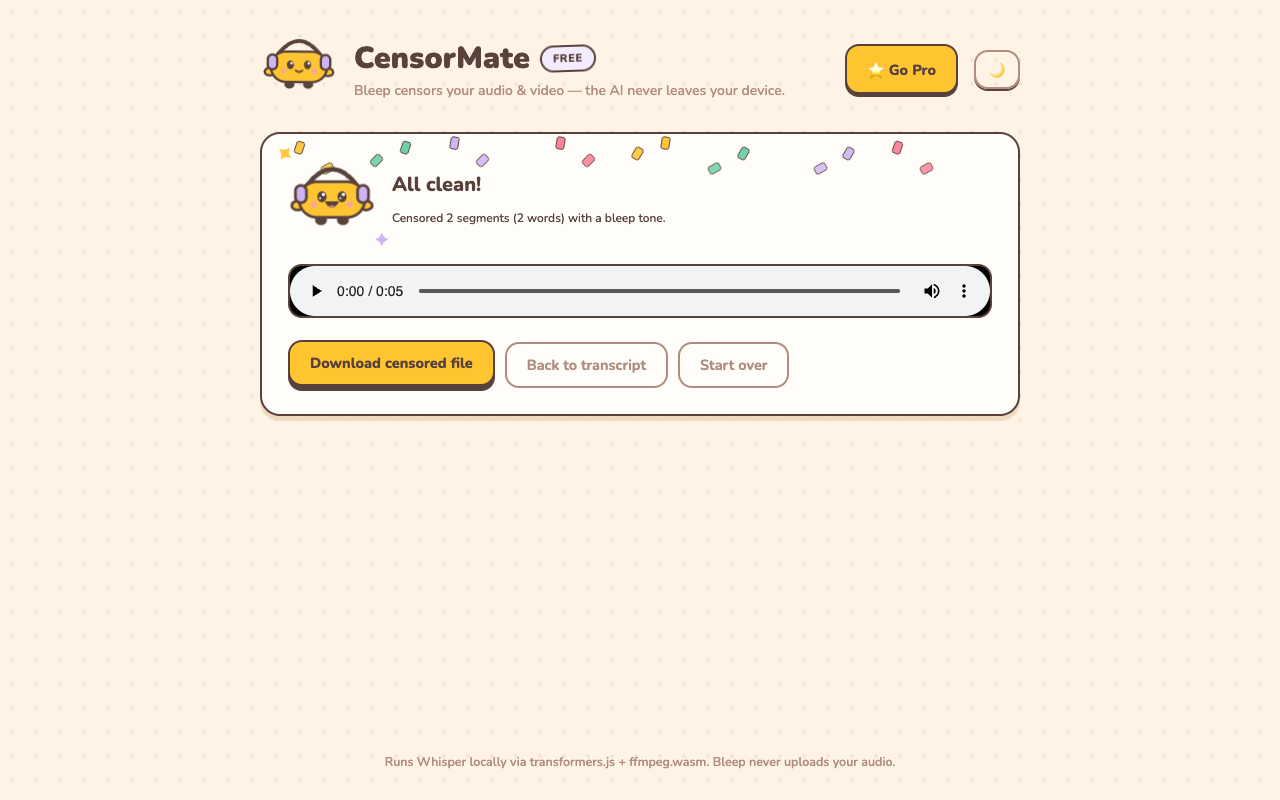
Done — the video stream is copied untouched; only the audio track is rebuilt.
Do Captions and Auto-Captions Trigger Demonetization Too?
Yes — and this is the trap most creators miss. YouTube’s systems read your caption track as well as your audio, and auto-generated captions spell out every word you said for the text classifiers, even words a viewer might not catch by ear. Censoring your audio while leaving an uncensored .srt attached (or letting auto-captions transcribe the original) undoes the work.
The complete fix has two parts: bleep the audio and upload a matching censored caption file with the flagged words starred out (f***). CensorMate exports both together so the audio and the caption track always agree. Same rule for your title, description, and tags — the classifiers read everything, and profanity in a title triggers limited ads regardless of how clean the video is.
What About Music Lyrics, Guests, and Clips?
The classifier doesn’t care who said the word. Explicit song lyrics in the background, a guest on your podcast, a TikTok you’re reacting to, an NPC in a game — if strong profanity is audible, it counts against your video. This bites hardest in reaction and gaming content, where the swearing isn’t yours. The workflow is identical though: run the file through a censor with a keyword list before upload, and the AI catches other people’s language just as easily as yours. For a montage of clips, batch censoring handles the whole folder in one pass.
How Do I Get an Already-Demonetized Video Re-Monetized?
The yellow icon isn’t a life sentence. The route back, in order:
- Fix the actual cause first. Appealing an honestly non-compliant video wastes your one shot — human reviewers uphold the bots when the profanity is really there. Identify the flagged language (your memory, comments, or a transcript pass), and censor it.
- Small fixes: use YouTube’s built-in trim/blur. For one or two problem moments, Studio’s editor can cut them from the published video without losing the URL, views, or comments.
- Bigger fixes: re-upload a censored version. For profanity sprinkled throughout, censor the source file and re-upload. You lose the view count but keep the revenue potential — a censored re-upload of a proven performer usually out-earns leaving the yellow-icon original up. Our remove-profanity guide walks through it.
- Then request review. In Studio → Monetization, request the human review. Clean first 15 seconds matter disproportionately here — if your intro was the problem, fixing just that region frequently flips the verdict.
Beyond Profanity: 2026 Best Practices
- Guard your first 15 seconds religiously. The intro carries the most classifier weight — keep it spotless even if the rest of the video is edgier.
- Check titles, thumbnails, and descriptions. Censoring your audio doesn’t help if the f-word is in your title.
- Self-certify honestly. Accurate self-ratings build trust with YouTube’s system; wrong ones get you audited more often.
- Appeal yellow icons — after fixing the cause. Human review can overturn the bots, but only if the video actually complies.
- Re-edit and re-upload old evergreen videos that got flagged. A censored re-upload of a proven performer often out-earns leaving the yellow-icon original up.
The Math That Makes This a No-Brainer
Say your videos average $500 in lifetime ad revenue. A yellow icon at 70% revenue loss costs you $350. Censoring the video before upload takes about three minutes, and even the one-time $4.99 Day Pass — no subscription — is under 2% of that single yellow icon. There is no version of this trade that favors gambling with the classifier.
Frequently Asked Questions
Does bleeping actually prevent demonetization?
Yes — what matters to the classifier is whether the profanity is audible in the final upload. A properly placed bleep (or clean silence) that fully covers the word, paired with a censored caption track, removes the trigger. A sloppy bleep that leaks the first consonant may not — trim tight.
How many swear words does it take to get demonetized?
There’s no published number, and it’s weighted, not counted: one strong word in the first 7–15 seconds outweighs several buried at minute nine. Repeated strong profanity throughout reliably earns limited ads; scattered moderate language after the intro usually doesn’t. Treat the intro as zero-tolerance and the rest as a budget you don’t want to spend.
Is “damn” or “hell” a problem?
No — moderate language (“damn,” “hell”) is fine for monetization under the 2026 guidelines, even in the intro. The risk tier starts at strong profanity, with the f-word family carrying the most weight.
Do the bleep sounds themselves hurt monetization?
No. Bleeps are a broadcast convention YouTube’s systems understand; a video full of bleeps can be fully monetized. If the tone itself annoys you, silence works identically — and there are subtler censor sounds than the classic 1 kHz.
Does demonetization affect my whole channel?
A single yellow icon doesn’t. But repeated violations — especially wrong self-certifications — increase how often your uploads get audited, and severe or persistent issues can escalate to channel-level monetization review. Fixing videos before upload is cheaper than managing a pattern after.
Related guides: YouTube auto-censor: bleep swearing automatically · The first 15 seconds rule · Remove profanity from YouTube videos · How to censor videos online · How to censor podcasts
Censor your videos in minutes — right in your browser
CensorMate finds and bleeps any word with on-device AI. Nothing is uploaded, ever. Free to start.
Try CensorMate free